
After getting the SSD for my system, I’ve been able to repartition the existing HDD into a data-only drive. I typically have a small partition for general files (basically my documents and source code), and a big one for large files (various media).
The question was: what cluster size should I choose for each partition?
Received wisdom
In the past I choose the default size of 4 kB for most partitions, with a larger size for those on which I know I’m going to be storing large files. This habit was formed out of received “wisdom” (i.e. peer pressure) and a general understanding of file systems. The practical effects of these choices are, as I understand them, roughly the following:
- 4 kB – the default NTFS cluster size, which enables useful features like compression. Compression should not generally be used but can be extremely useful when you have large quantities of compressible data that you need to keep available but which is infrequently used. Writing to compressed files can be expensive, but for reading they can be even cheaper than uncompressed files, because fewer disk reads are necessary for the same amount of data. The tradeoff depends on whether disk bandwidth or CPU time is the more precious commodity in your system.
- 4 kB – matches the memory page size (which could conceivably make paging marginally more efficient, but I honestly have no evidence of that and insufficient knowledge to do more than list it as a possibility).
- 4 kB – has modest internal fragmentation, with an average of 2 kB wasted per file. (The smallest cluster size of 512 bytes has even less fragmentation, of course. But it may have other downsides.)
- 64 kB – ensures a large minimum extent size, so at least 64 kB can always be read contiguously.
- 64 kB – has potentially high internal fragmentation — average of 32 kB wasted per file. With large files this will be negligible, but for small files the amount of wasted space will be significant.
- 64 kB – there will be fewer clusters in the partition, so less file system metadata may be required. My understanding is that NTFS uses extents to record cluster usage, but some things such as free space bitmaps may be smaller.
Normally I’d be satisfied that these are adequate choices, and resigned to the fact that I probably won’t notice any difference.
But this time, I thought I’d put a bit more research into the decision. Not only did I want to make the new system as efficient as possible, I was also curious about whether my HDD partitioning beliefs these past years were accurate.
What advice does the internet have? As expected, a lot. Some of it is based on rather suspect reasoning, and all of it seems to be on assumption rather than experience — let alone experimental data. There were no obvious benchmarks to be found. Perhaps it was time someone conducted an experiment.
Expectations from basic theory
Without knowing much about file systems, it is reasonable to guess that, in addition to the cost of reading or writing data, there is an overhead per cluster accessed. So, the fewer clusters to be accessed per unit size, the lower this overhead will be. The number of clusters is inversely proportional to the cluster size. The total cost of cluster accesses becomes significant when there are very many small clusters in a file.
Another possibility is that with larger clusters, there will be a larger amount of excess data in any cluster that is accessed. (Although it’s possible that NTFS optimises partial cluster reads and writes down to their minimal size in blocks.) So, when accessing a full file there is an average of half a cluster of unused data in the final cluster to be read or written; similarly when reading or writing at any point within a file, an entire cluster must be accessed. This cost is proportional to the cluster size, and so becomes great when cluster sizes are very large.
The sum of these costs for cluster size s is 
The experiment
For each cluster size between 512 bytes and 64 kB, perform a benchmark:
- Start with a partition on the HDD.
- Format it with the candidate cluster size.
- Make a note of the free space on it.
- Benchmark for moderate sized files:
- Copy a large data set of files from another location.
- Make a note of the space remaining after the copy.
- Randomly read from a location in each file.
- Read the full contents of each file.
- Benchmark for large sized files, using the same steps as for moderate sized files.
Avoid performing any other activity on the computer while benchmarking. Repeat each benchmark several times to average out these effects.
The drive to be tested is a Western Digital Caviar Green 2TB, with 64MB Cache running on SATA II. The same partition is reused, which takes up the last 67% of the drive. (A common danger of benchmarks in the past was the use of different parts of a drive for each test — such as comparing Windows vs Linux file system performance on a machine with a partition for each operating system; the speed of the drive can depend on which part of it is being accessed.)
The same data sets of files are used in each benchmark. The moderate sized file set consists of 30,497 files of total size 11.2 GB. The large sized file set consists of 134 files of total size 20.4 GB. The same pattern of random reads is used in each benchmark.
Results
I have conducted the above experiment and I’ll try to summarise the results here.
Space usage
Firstly, some observations on space usage. The initial space after formatting the partition depends on the cluster size. In fact, approximately 8 bytes of space is required per additional cluster.
And, as expected, larger cluster sizes result in some wasted space in the final cluster of each file (internal fragmentation). For small files on large clusters this can be significant. For sufficiently large files we expect to waste half a cluster per file. But if many files are smaller than half a cluster then more will be wasted. For my set of moderate size files, the average waste for clusters of size 64kB was 42.5kB (on an average file size of 387kB).
Speed
Very small clusters are noticeably inefficient for simple copying. For both small and large files, cluster sizes of 4096 or greater are all approximately equal in performance. Note that the “small files” of this experiment were not especially small; the small cluster sizes may have more favourable performance when the files are closer to that size.

For random reads, the results are less obvious. There is some penalty for small clusters, but there is also very poor performance for the large cluster size of 32kB. For both big and moderate files, the best cluster size for random reads is the largest, 64kB. This goes against the expectation that large clusters have an additional cost incurred by the waste of accessing a whole cluster when only part of it is used.

For full sequential reads of all file data, we have the interesting phenomenon that moderate sized files benefit more from large cluster sizes than do large files. I’m not sure how to explain this; it may be due to the small sample size. The effect is too small to conclude that cluster size makes much difference for this task.
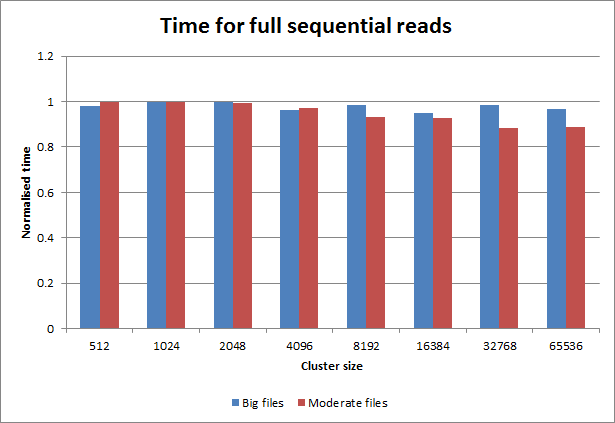
Conclusions
For all tasks tested, cluster sizes smaller than the default — those that are 512, 1024 or 2048 bytes — are less efficient than the default size of 4kB. As mentioned, those sizes may still pay off if very small files are to be stored on the file system.
Above the default size, larger cluster sizes confer benefit for some tasks, even for moderately sized files that may occupy only a few clusters each.
The largest cluster size of 64kB can result in 10% more space being used for the moderate sized files used in this test.
The speed differences seen in this test between the large sizes and the default size were not significant enough to recommend large sizes. But a future experiment with more benchmark samples, larger test sets, and better experimental conditions may give clearer data.
I was curious to see whether there are obvious benefits to large cluster sizes. Apparently, there are not.
 EJRH
EJRH 
4KB and 64KB are best. The most universal is 4KB cluster size. 64KB only to big data.
Very good experiment ;-)
thanks for sharing. i had just setup a ahci gpt 4tb data partition and wondered if i should choose default 4096 or 512 during the final ntfs format stage, so i’m glad i found your article. 512 made sense before 2008 when most were still using WinXP, but now with Win7/8 every new os/app expects us to be on 4096 clusters where HDD ECC works best. if you have a tone of small files, you should ZIP them all up into a on large file – there are even third party programs that make that seamless.
Pingback: Clustergrootte instellen nieuwe hdd 3T?
Thanks for sharing this information. I found it helpful. Just about to format a Kingston Data Traveler HyperX 256GB USB drive and found your article. Very informative…Thank you!
Another satisfied reader… very helpful since structure and easy to extract information, which are actual benchmark results, so its even backed up . Thanks !
Thanks for delivering some science!
Great stuff but you didn’t make one of the most important charts, in my estimation – the amount of wasted space vs cluster size, for both scenarios. Your key finding for this is how the index uses 8 bytes per cluster. Do a directory dump of all the files in question (e.g. command box DIR /S >DirOut.txt), massage this into a spreadsheet (one row per file), then compare how changing the cluster size affects both wasted space (for each file) and the total size of the index. You will get a U-shaped curve with an optimum least-wasted space near the middle. (At the low end, very small clusters on very large disks, the index is absolutely huge; at the other end, for very large clusters, the total space wasted by files is huge.) This will differ a little for your two different scenarios. But comparing both U curves will give nice boundaries on the sweet spot. I did this for FAT and FAT32 20 years ago. I don’t have the time to do it right this moment. Your speed tests add additional important info (either neutral or in favor of 4k or larger, it seems). Bravo, thanks!
Thanks! You answered my question on cluster size.
This is a great experiment, exactly what I was looking for, thank you!
Good article. I was looking for swap file page size. I usually leave the 4K default with the following exceptions: SQL Server data always 64K, virtual disks usually 64K depending upon the drive. Thanks
Thanks for doing this. Now, if someone really wanted to waste time, they could do similar experiment to matrix results of RAID 0 stripe size along with HDD cluster size (eg. stripe 128K with cluster 4K, and stripe 64K with cluster 64K, etc.) That would close out numerous conversations on the web which are all based on speculation right now.
Why doesn’t microsoft make this sort of info readliy available i’m sure they payed someone to run these sorts of tests and would have tons of data on the subject but i hate using their sites. What about small SSD & USB flash drives you would want only small cluster size to make for less unused space and for eg: running software in a read only situation you would go small as possible because of the better read time, or could this cause extra wear and tear and excess heat?
You should also not forget to think about VSS. I was reading from PURAN DEFRAG:
“Defragmenting your drives always has the risk of losing shadow copies as Windows Shadow Copy Service see defrag of files as a change to them as hence make unnecessary updates to shadow copies losing old copies. It is not just Puran Defrag but any defragmenter using Windows API is affected by this.
One was is to format your drives with Cluster Size of 16K. This cluster size enables Shadow Copy Service to differentiate between real change to files and movement by defragmentation and Shadow Copies are not lost.”
I have not yet tested to change the cluster size to 16K, but I have it still on my todo-list,
Currently, I am woking wiht 4 k and 64k cluster sizes.
As anybody exerince with 16k in regards of VSS?
I am an engineer and I really thank you for your time spent on this interesting experiment. I would suggest to publish it in a convenient journal or magazine.
Another big issue in performance is file fragmentation, and large cluster sizes are better in avoiding fragmentation (ie: it’s impossible to fragment a file smaller than cluster size). Benefits due to less fragmentation are by far more important than waste size, specially on big HDs.
A more comprehensive test would require the usage of whole line of SSD from one manufacturer, a whole line from second manufacturer and some 10000 or 15000 RPM HDD for comparison. But this here gives us some entry data at least
EXCELLENT! I RECENTLY WENT ROUND AND ROUND DOING JUST THIS WITH EX-FAT ON SSD AND MEM STICKS. BUT COULD NOT UNDERSTAND THAT I WAS GETTING SOMETIMES WORSE RESULTS WITH SAY 8192 THAN 4096 AND DIDN’T WANT THE SPACE LOSS OF 32 OR 64 (THE “DEFAULT” ON LARGE DRIVES). GOING LESS THAN 4096 ALSO SEEMED TO CAUSE SOMETIMES LESS SPEED AND WITH LARGE AMOUNTS OF FILES I ALSO WORRIED ABOUT THE FAT’S OR MFT’S. WITHOUT YOUR GREAT BENCH-MARKING I JUST GUESSED THAT MS OS’S PREFERRED GOING FROM 4096 NTFS TO 4096 ANYTHING ELSE AND YOU EVEN ADDRESSED THAT IN PAGING FORMAT (4096). YOUR BOTTOM LINE IS MORE HELPFUL!! FOR AVERAGE MIXES OF DOC’S AND MEDIA, OR WEBPAGES AND ISO’S OR EVEN LARGE BACKUPS, IN MY CASE 16 IS BETTER THAN 4096 OR 8192, AND EVEN 64 IS BETTER THAN 32, FOR THE LARGE GB SIZE FILES, SURPRISINGLY EVEN IF THE DRIVE ALSO CONTAINS A FAIR AMOUNT OF SMALL FILES. NOT INCLUDING THE INDEXING JOURNAL OR COMPRESSION ETC. OF NTFS SHOULD INCREASE THE LIFE-CYCLE OF SSD’S SIMPLY BY REDUCING BYTES READ-WRITTEN IRREGARDLESS OF CLUSTER SIZE. EXCELLENT! AND YES 7-ZIP WOULD WORK GREAT TOO FOR STORING LARGE AMOUNTS OF SMALL FILES INTO LARGE CLUSTERS.
AGAIN: 16 OR 64 DEPENDENT ON YOUR APP. I.E. GROUCHY, “virtual disks usually 64K depending upon the drive.” THAT IS A REAL CONSIDERATION. I TOO AM PERTURBED AT MS’S LACK OF DOCUMENTATION TO THIS POINT AND IT DID COME UP DURING MY EX-FAT TESTS. I WOULD REFER READERS TO THE SPEED TESTS DONE AT MICROSOFT ON 2012 AND REFERENCED IN THE FAMOUS “2012 JUMP START” WHERE THEY REACHED A MILLION TRANSFERS A SEC. WITH OVER A HUNDRED SERIAL ATTACHED USED SSD’S, AND THEN NEARLY A MILLION AND A HALF WHEN THEY USED NEW SSD’S. THEY NEVER MENTIONED THE FORMAT OR CLUSTER SIZE AS A FACTOR, 2012’S LIMITING FACTOR BEING THE DRIVES THEMSELVES AS THE POINT. GETTING THE MOST FROM EACH DRIVE SEEMS PARAMOUNT TO “GETTING THE MOST” FROM YOUR SERVER.
Great analysis, thank you for sharing!
Great article. Just a comment, may be you can see more dramatic differences with a very narrow partition, for instance 1gb. The access speeds are very variable at beginning and end of plates. Thank you for this great info
could you try the same for exFAT? the range of AUS is much much bigger there and I wonder what transfer speeds would be like with a 32MB allocation.
I need this test (exFat) too! so necessary!
I’ve found an important facet of UAS; SSD caching. PrimoCache performs best when the cache UAS matches the file system, and a 128 GB cache using 4k UAS needs 3.6 GB of RAM of manage, while the same size with a 64k UAS uses 230 MB of RAM.
On traditional HDD (rotational ones) cluster size makes a very little difference, since internal HDD combined with NTFS caches optimizes reads/writes to do less head movements.
But on SSD the difference can be really HUGE, most when using striping with NxSSD, a 4KiB stripe size can cause NxSSD speed be less than just one SSD speed.
Benchmark any SSD with read/write on blocks of 4KiB upto 128KiB and you will see that speed with 128KiB is (on most SSD) double than with 4KiB.
My tests with 2xSSD gives a 1.97x speed with 2xSSD when using 128KiB and 64KiB cluster size (it can be as huge as 2MiB for big partitions), some defragmenters can not work on them, some clone tools does not understand them, etc. Most software thinks max cluster size for NTFS can be 64KiB, that also includes visual windows screen to format a NTFS partition. To get such huge clusters sizes. at least by now, i am forced to use ‘diskpart’ command tool.
is this apply to ramdisk too?
RAMDISK and SSD will benefit from large cluster/sector sizes by reducing the overhead time to process each cluster/sector, MFT tables will be smaller and more will fit on faster cache.
You don’t defrag an SSD drive, it will fastly consume it’s life: They have limited amount of write operations. Besides Defrag gains nothing, access time is the same regardless of sector placement or order.
I wonder if the results would be the same using an external drive, via USB 3? The hardware interface might be more important, and this configuration is widely used.